
The digital world offers endless opportunities, but it also harbors threats that can compromise your security, privacy, and finances. Fake accounts have become increasingly sophisticated, making it essential to recognize and stop them before they cause harm.

Every day, millions of people fall victim to scams orchestrated through fraudulent profiles on social media, messaging apps, and email platforms. Understanding how these fake accounts operate and learning to identify suspicious alerts can be your best defense against cybercriminals who prey on unsuspecting users across the internet.
🔍 Understanding the Landscape of Fake Accounts
Fake accounts are deliberately created profiles designed to deceive, manipulate, or extract information from genuine users. These accounts can appear on virtually any platform, from Facebook and Instagram to LinkedIn, dating apps, and even professional networking sites.
Cybercriminals invest considerable effort into making these profiles appear legitimate. They steal photos from real people, craft believable backstories, and engage with content to build credibility. The motivations behind fake accounts vary widely, including financial fraud, identity theft, spreading misinformation, phishing attacks, and even corporate espionage.
The scale of this problem is staggering. Studies suggest that between 5% to 15% of all social media accounts may be fake or fraudulent. This translates to hundreds of millions of deceptive profiles actively circulating online, waiting to exploit vulnerable targets.
🚩 Red Flags That Signal a Fake Account
Learning to spot the warning signs of fraudulent profiles is your first line of defense. While sophisticated scammers continue to evolve their tactics, certain patterns consistently emerge that can help you identify suspicious accounts.
Profile Picture Inconsistencies
Fake accounts often use stolen photographs that appear too professional, overly attractive, or inconsistent with the account’s claimed identity. Many scammers use stock photos or images of models that can be found through reverse image searches. If a profile picture looks like it belongs in a magazine rather than a personal photo album, investigate further.
Limited or Generic Content
Authentic accounts typically have a history of varied posts, comments, and interactions that reflect genuine personality and interests. Fake accounts often display minimal content, generic posts copied from elsewhere, or sudden bursts of activity after long periods of silence. Check the account’s timeline for consistency and authenticity.
Suspicious Friend or Follower Patterns
Examine the account’s connections carefully. Fake profiles frequently have disproportionate follower-to-following ratios, connections from disparate geographic regions with no logical connection, or friends who also appear suspicious. Legitimate accounts typically show organic relationship patterns.
Unusual Communication Patterns
Scammers often reach out with urgent requests, overly friendly messages to strangers, poor grammar or awkward phrasing, or attempts to quickly move conversations to other platforms. Be wary of anyone who contacts you unexpectedly with investment opportunities, romantic interest, or requests for help.
💼 Common Scam Tactics Used by Fake Accounts
Understanding the specific strategies employed by scammers helps you recognize threats before you become a victim. These tactics are constantly refined, but certain approaches remain consistently popular among cybercriminals.
Romance Scams
Fraudsters create attractive profiles and build emotional connections with targets over weeks or months. Once trust is established, they fabricate emergencies requiring financial assistance. These scams cause billions in losses annually and devastating emotional harm to victims who believed they had found genuine connection.
Investment and Financial Fraud
Fake accounts promote get-rich-quick schemes, cryptocurrency investments, or trading platforms that promise unrealistic returns. They often share fabricated screenshots of earnings and testimonials from other fake accounts to build credibility. Once victims invest money, the scammers disappear with the funds.
Phishing and Information Theft
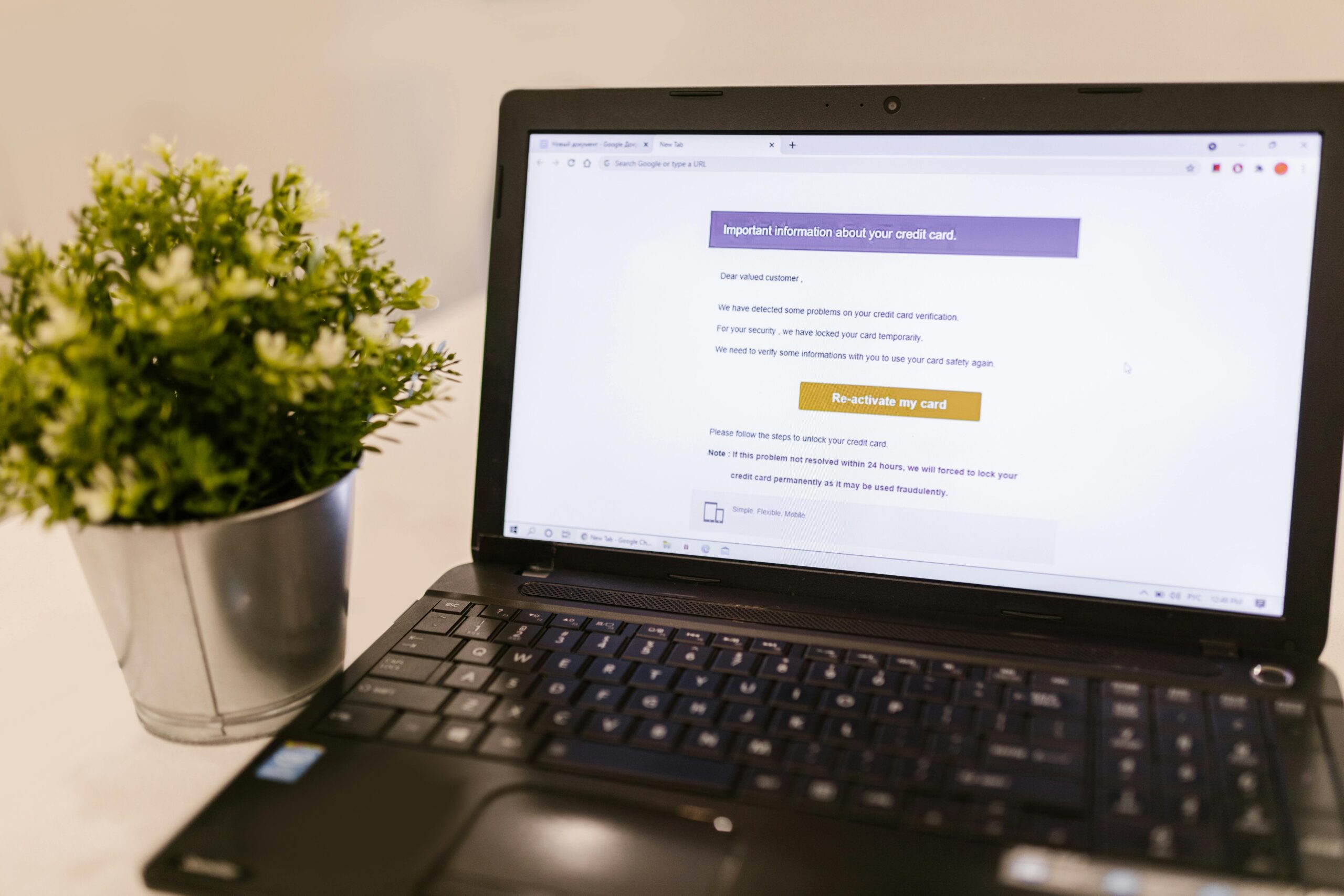
Some fake accounts send messages with malicious links that appear to be security alerts, prize notifications, or urgent account verifications. Clicking these links can install malware, steal login credentials, or compromise your device. Always verify the authenticity of unexpected messages through official channels.
Impersonation Schemes
Scammers create accounts impersonating friends, family members, celebrities, or official organizations. They leverage the trust associated with these identities to request money, spread misinformation, or gain access to sensitive information. Always verify unexpected requests through alternative communication methods.
🛡️ Essential Tools and Techniques for Protection
Protecting yourself from fake accounts requires a combination of vigilance, technical tools, and informed practices. Implementing these strategies significantly reduces your vulnerability to online scams and fraudulent activities.
Reverse Image Search
When you suspect a profile photo might be stolen, use Google Images or specialized tools to conduct a reverse image search. This technique reveals whether the photo appears elsewhere online, potentially exposing stolen identities or stock images used by scammers.
Privacy Settings Optimization
Configure your social media privacy settings to limit who can view your information, contact you, or see your connections. Restrict personal details like your phone number, email address, and location to trusted contacts only. The less information publicly available, the harder you become to target.
Two-Factor Authentication
Enable two-factor authentication on all accounts that offer it. This security measure requires a second form of verification beyond your password, making it significantly harder for scammers to access your accounts even if they obtain your login credentials through phishing or data breaches.
Security and Authentication Apps
Dedicated security applications can help protect your digital identity and verify suspicious communications. Google Authenticator, for example, provides an additional layer of security for your online accounts through time-based verification codes.
📧 Recognizing Suspicious Alerts and Messages
Fake accounts often send alerts designed to create urgency and bypass your rational judgment. Learning to recognize these manipulative messages protects you from making hasty decisions that compromise your security.
Characteristics of Legitimate Alerts
Genuine security alerts from reputable companies typically arrive through official channels, include specific account information, never request passwords or sensitive data, and provide clear ways to verify authenticity. They maintain professional language and formatting without creating artificial urgency.
Common Suspicious Alert Patterns
Fraudulent alerts often contain urgent language demanding immediate action, grammatical errors or awkward phrasing, generic greetings instead of your name, suspicious sender addresses that mimic but don’t match official domains, and unexpected attachments or links. Always pause and verify before responding to alarming messages.
Verification Procedures
When you receive a suspicious alert, never click embedded links or call provided phone numbers. Instead, independently navigate to the official website through your browser, contact the organization through verified channels listed on their official site, or visit a physical location if applicable. Legitimate organizations understand and appreciate this caution.
👥 Social Engineering: The Human Element
Many successful scams rely less on technical sophistication and more on psychological manipulation. Social engineering exploits human emotions, trust, and cognitive biases to bypass security measures and extract information or money from victims.
Scammers study human behavior to craft approaches that trigger specific responses. They create artificial scarcity, appeal to greed or fear, establish false authority, or exploit empathy and desire to help. Understanding these psychological tactics makes you less susceptible to manipulation.
Common social engineering techniques include pretexting (creating fabricated scenarios), baiting (offering something attractive), tailgating (using one piece of information to gain more), and quid pro quo (offering services in exchange for information). Awareness of these methods helps you recognize when someone is attempting manipulation.
🌐 Platform-Specific Protection Strategies
Different platforms present unique vulnerabilities and require tailored approaches to security. Understanding the specific risks associated with each platform helps you implement appropriate protective measures.
Social Media Platforms
Facebook, Instagram, Twitter, and similar platforms face constant challenges with fake accounts. Use platform-specific reporting tools to flag suspicious profiles, verify accounts through official verification badges when available, and be skeptical of friend requests from unknown individuals, especially those with few mutual connections.
Messaging Applications
Apps like WhatsApp, Telegram, and Signal offer end-to-end encryption but remain vulnerable to social engineering. Never share verification codes with anyone, be cautious of messages from unknown numbers, and verify contacts through alternative methods before responding to unusual requests.
Professional Networks
LinkedIn and similar platforms attract scammers targeting professionals with fake job offers, investment schemes, or corporate espionage. Verify company information independently, be cautious of unsolicited job offers that seem too good to be true, and never share confidential information with unverified contacts.
Dating Platforms
Online dating sites are prime hunting grounds for romance scammers. Meet in public places for initial encounters, be wary of anyone who refuses video calls or in-person meetings, never send money regardless of the story, and trust your instincts if something feels off.
📱 Mobile Security Considerations
Mobile devices present unique security challenges due to app permissions, location tracking, and the always-connected nature of smartphones. Protecting your mobile device is essential for comprehensive online security.
Review app permissions regularly and revoke access that seems unnecessary for the app’s function. Many applications request far more permissions than they need, creating potential vulnerabilities. Download apps only from official stores, keep your operating system updated, and consider using mobile security software for additional protection.
Be particularly cautious when connecting to public Wi-Fi networks, which can be monitored or even operated by malicious actors. Use VPN services when accessing sensitive information on public networks, and consider disabling automatic Wi-Fi connection features that might connect you to risky networks without your knowledge.
💡 Building Long-Term Digital Safety Habits
Staying safe from fake accounts and scams isn’t a one-time effort but an ongoing practice of vigilance and informed decision-making. Developing strong digital safety habits creates lasting protection against evolving threats.
Regularly audit your online presence by searching for your name and information to see what’s publicly available. Remove or restrict unnecessary personal details that could be used by scammers to craft convincing approaches. Update passwords periodically using strong, unique combinations for each account.
Stay informed about emerging scam tactics by following cybersecurity news and official advisories from platforms you use. Scammers constantly adapt their methods, and awareness of new techniques keeps your defenses current. Share this knowledge with friends and family, particularly those who may be more vulnerable to online scams.
Maintain healthy skepticism without becoming paranoid. Not every unexpected message is a scam, but approaching online interactions with appropriate caution protects you from the majority of threats. When something seems too good to be true or creates urgency and pressure, step back and verify before taking action.
🎯 Taking Action Against Fake Accounts
When you identify a fake account or encounter a scam attempt, taking appropriate action helps protect both yourself and the broader online community. Reporting suspicious activity contributes to platform security and law enforcement efforts.
Most platforms provide straightforward reporting mechanisms for fake accounts, suspicious messages, and fraudulent content. Use these tools to flag problematic profiles and content. While individual reports may seem insignificant, they contribute to pattern recognition that helps platforms identify and remove coordinated scam operations.
If you’ve been targeted by a scam, document all communications, transactions, and relevant information. Report the incident to the platform where it occurred, your local law enforcement, and relevant consumer protection agencies. If financial loss occurred, contact your bank or payment provider immediately to report fraud and potentially recover funds.
Share your experience with others to raise awareness and prevent additional victims. Many people feel embarrassed after falling for scams, but sharing these stories educates others and helps remove the stigma that keeps victims silent. Your experience can be the warning that saves someone else from similar harm.
🌟 Empowering Yourself Through Education
The most effective defense against fake accounts and online scams is knowledge. Understanding how these schemes operate, recognizing warning signs, and knowing appropriate responses transforms you from potential victim to informed participant in the digital world.
Cybersecurity isn’t just for technical experts—it’s a fundamental skill for anyone who uses the internet. Invest time in learning about online safety through reputable resources, official platform guidance, and cybersecurity organizations. Many offer free educational materials designed for general audiences.
Consider this knowledge as digital literacy, equally important as traditional literacy in our connected world. As technology evolves and new platforms emerge, the principles of critical thinking, verification, and cautious engagement remain consistently valuable across all digital spaces.
Your online safety journey doesn’t end here. Continue developing awareness, updating your knowledge, and refining your practices. The digital landscape will continue changing, but informed, vigilant users will always be more difficult targets for scammers and cybercriminals.
By implementing the strategies outlined in this guide, you’ve taken significant steps toward protecting yourself from fake accounts, scams, and suspicious alerts online. Stay vigilant, trust your instincts, and remember that taking time to verify is always preferable to rushing into decisions that compromise your security, privacy, or finances. Your digital safety is worth the effort.




